Legal and data Privacy

How do I update my communication preferences with Arbolus?
written by

Arbolus Support

published on

There are two ways that you can update your communication preferences on the Arbolus Platform.

1. Project Notifications

Once logged in to your Arbolus Expert account you can modify your project notification preferences.


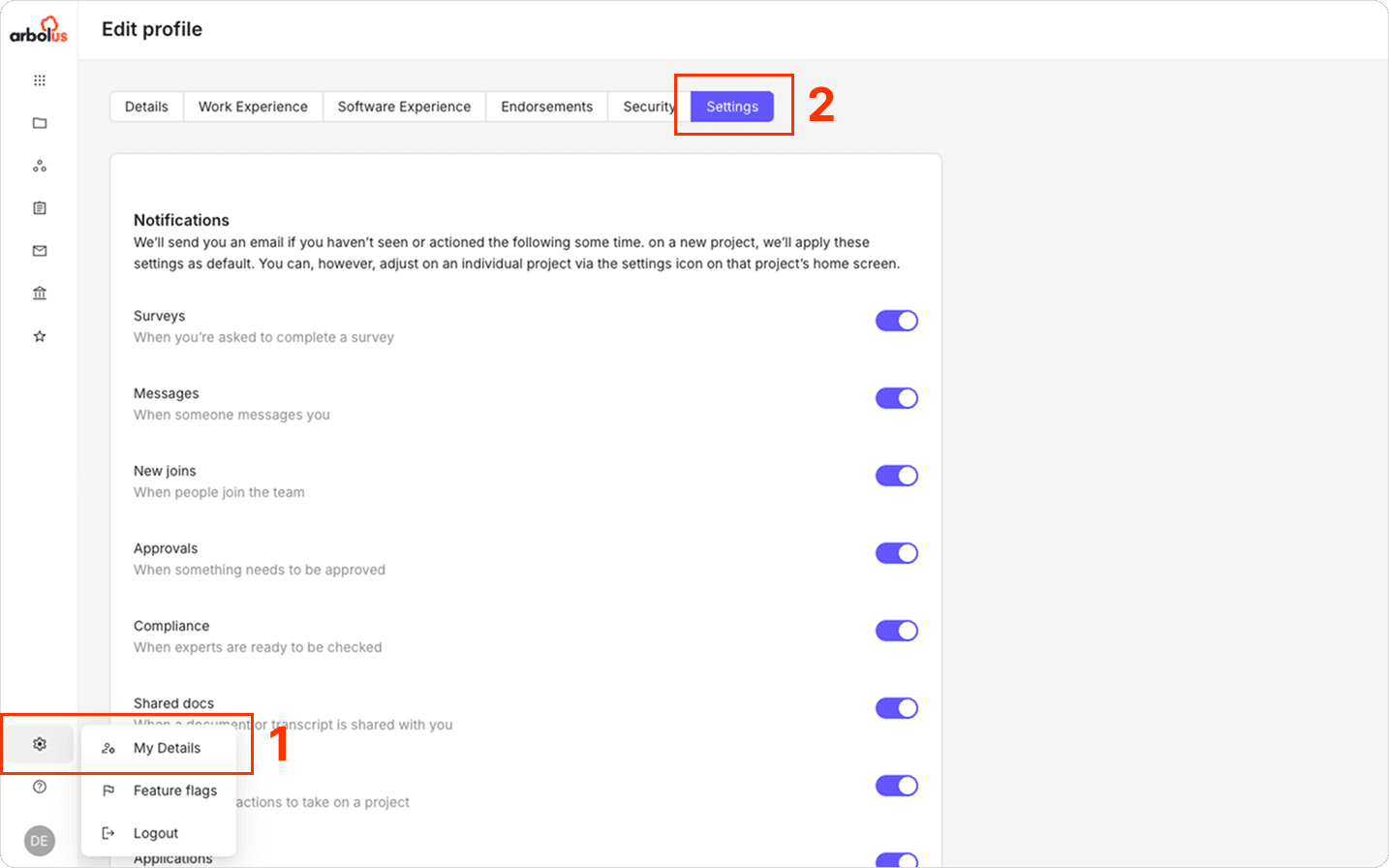
For notifications that you may receive regarding the status and progress of a project you’re contributing to, you can update your preferences by:

  • Click the settings cog in the lower left corner

  • Click ‘My Details’ 

  • Click ‘Settings’ tab


2. Opt-Out from all communication

Once logged in to your Arbolus Expert account you can opt-out of Arbolus communication by using the ‘deactivate account’ option in your Expert account. 

To deactivate your account

  • Click the settings cog in the lower left corner

  • Click ‘My Details’ 

  • Click ‘Settings’ tab

  • Scroll down to the bottom and click ‘Deactivate Account’.
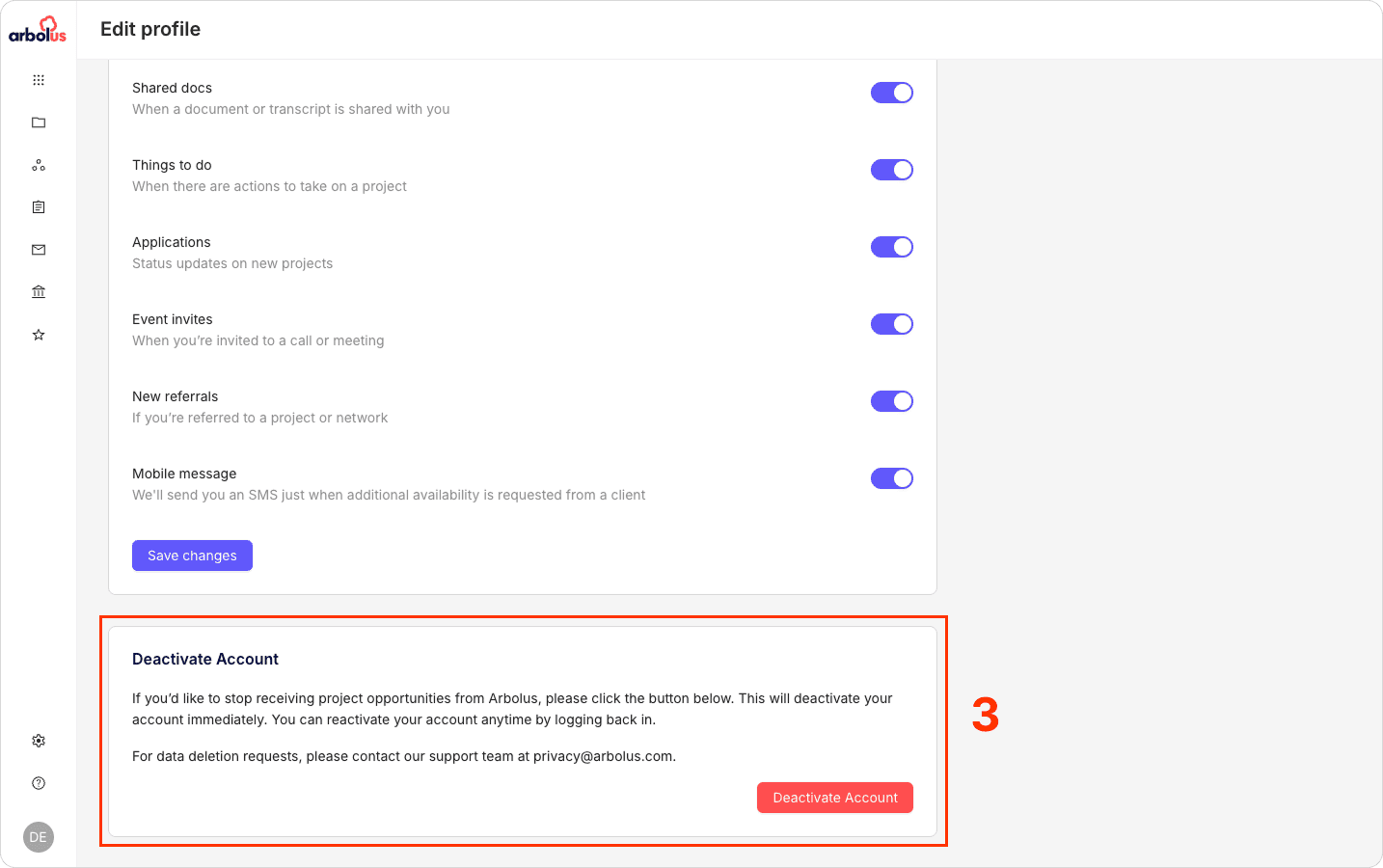
If you deactivate your account, you will be opt-ed out of all communication from Arbolus, meaning:

  • We will not communicate with you via telephone call

  • We will not communicate with you via SMS, iMessage, or Whatsapp

  • We will not communicate with you via LinkedIn

  • We will not communicate with you via email

  • We will not consider your suitability for any projects that we are facilitating.


Please note that in some limited circumstances it may take a few days for your communication preferences to be updated across all Arbolus systems.


To opt-in again simply re-activate your account by logging back into your Arbolus Expert account, otherwise contact privacy@arbolus.com 

This article is intended for experts, make sure you are in the right place.

More expert resources

Client Features

4 MIN

Arbolus Canopy

ArbolusCanopy is a video insights tool that allows you to get key qualitative data from multiple experts, without having to schedule calls. 

Read more

Client Features

2 MIN

Arbolus Single Sign-On (SSO) Integration Guide

Configuration steps for IdP and SP initiated Auth flow with Single Sign-on (SSO) using OpenID Connect (OIDC) initiated by Okta and/or via Okta Dashboard or Okta Browser Plugin

Read more

Legal and data Privacy

1 MIN

Whistleblowing Policy and Guidelines

Arbolus is committed to maintaining high ethical standards and fostering a culture of transparency and accountability. This Whistleblowing Policy aims to report extreme concerns regarding unethical behaviour, fraud, or any violations of company policies without fear of retaliation. Reporting Procedure: A confidential and secure reporting channel is provided here for all of you to raise concerns anonymously if you feel uncomfortable disclosing your identity. While submitting a report, you can: Select a category that best defines the case. Describe the situation, and upload any supporting files if needed. Save the unique password provided with the confirmation of the submission to follow up on the case. Investigation and Response: Upon receiving a report, the company will promptly investigate and address the concerns raised. Fair Process: Investigations will be conducted impartially and fairly, respecting the rights of all parties involved. These reports go directly to a secure, ticketing-like channel where only designated case managers can review submissions and respond confidentially.

Read more

4.4 TrustScore

200,000+ Experts

Earn and influence with your expertise

4.4 TrustScore

200,000+ Experts

Earn and influence with your expertise

4.4 TrustScore

200,000+ Experts

Earn and influence with your expertise